


Optum Perks: Rx Discount Card
4.4426.00 Reviews
App Specs
- Version
- 2.8.1 (2026080302)
- Updated On
- License
- Free
- Downloads
- 500,000+
- Developer
- Optum Inc.
- Categories
- Medical
- Platform
- Android
Screenshots

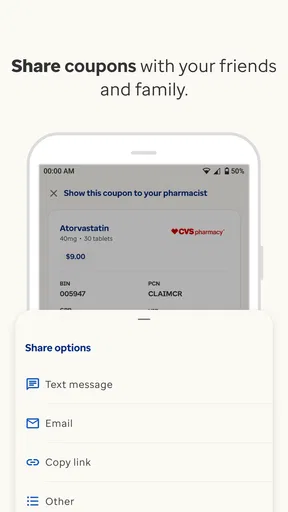
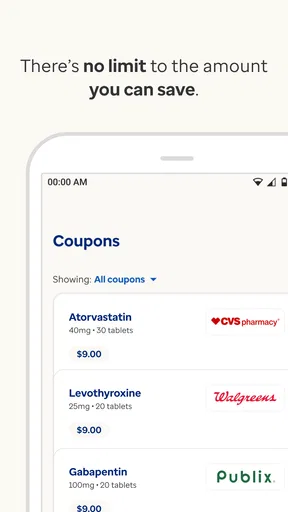
 Analysis by AppCompare
I tend to judge prescription-discount apps by one practical question: do they make a stressful pharmacy visit easier, or do they add another thing to manage? After spending time with Optum Perks: Rx Discount Card, I found that its value depends heavily on when and where you use it. It is a free medical app from Optum Inc. that helps people look for prescription savings and present a discount option at local pharmacies. That sounds simple, but the difference between preparing at home and searching while standing at the counter can be surprisingly important.
The app has a clear audience: people paying for medicine themselves, comparing pharmacy prices, or trying to reduce the cost of a prescription that is not being covered in the way they expected. It is available for Everyone and works on Android devices running version 6.0 or later. Its average rating is 4.4 from around 1,200 ratings, with more than 500,000 installs, so it has found a useful place among everyday healthcare tools. I would not treat it as a replacement for insurance, a pharmacist, or medical advice, but I do see it as a practical price-checking companion.
How the app feels when the connection matters
The central experience is built around finding a discount for a medication and using the result at a local pharmacy. That means connectivity is not a minor background detail. When I am at home with a reliable connection, the process feels much more manageable: I can take my time, check the medicine name carefully, and prepare before I leave. When I am already in a pharmacy, the same task becomes more dependent on the quality of the mobile connection and the speed of the search.
This distinction changes how I recommend using it. I would search before heading out whenever possible, especially for a new prescription or a medicine that has several possible forms. A calm search at home gives me time to check the exact product and avoid confusing a tablet with a capsule, or one strength with another. It also means I am less likely to hold up a queue while trying to load information on a weak signal.
The app is most useful when it turns a vague worry about cost into a concrete conversation. Instead of asking a pharmacist whether something might be cheaper, I can arrive with a discount option ready to discuss. The pharmacist still has to process the prescription and confirm the applicable price, but the app gives me a starting point. That is a meaningful improvement over guessing.
There is an important limitation here: a discount card is not automatically the lowest possible price in every situation. A person using insurance may find that their normal coverage is better, while another person may receive a lower price through a pharmacy’s own program or a generic substitution. I would compare the available options rather than assuming the app’s result should always replace insurance. The strongest habit is to ask the pharmacy to compare the discount price with the price already available to you.
Preparing before a pharmacy visit
My preferred workflow is deliberately boring. I check the prescription label or the information from the clinician, search the medication in the app, review the available local option, and keep the result accessible before leaving home. I also make sure the medicine details are correct instead of searching only by a partial name. This extra care matters because a small mismatch can make a price result irrelevant.
Worth Reading Before You Choose

EA SPORTS FC Mobile 26 Is a Bigger Football Game, but It Takes Time

Flipboard Shows What News Apps Must Do Beyond the Feed

Switching to Android Auto Means Rethinking Your Driving Routine

Google Calendar Makes a Crowded Week Easier to Manage

Ludo King Makes the Most of the Minutes Between Plans

Baby Panda World Brings Quick Play to Modern Phones, but Its Game Library Feels Busy
For a recurring prescription, I would repeat the check rather than assuming the previous result will remain useful forever. Pharmacy prices and availability can change, and a discount result is not a guarantee that the medicine will be ready at a particular location. The app helps with the price conversation; it does not replace calling the pharmacy when stock or timing is the real concern.
This is one of the less obvious strengths of the experience: it encourages preparation without requiring me to understand the complicated language of prescription billing. Someone who is comfortable with smartphones but not with insurance terminology can use it as a simple first step. The trade-off is that the user still needs enough attention to verify the medication and understand that the shown discount is an option, not a promise.
Using it in real mobile situations
The most realistic use case is a person leaving a clinic with a prescription and stopping at a pharmacy on the way home. If the medicine is expensive, opening the app before handing over the prescription can provide a useful alternative. Another scenario is a caregiver managing medicine for a parent: checking prices in advance can reduce rushed decisions, particularly when visiting a pharmacy in an unfamiliar area.
I also think it can help during a change in personal circumstances. Someone between insurance plans, facing a high deductible, or paying for a medicine that is temporarily outside their usual coverage may want a quick way to explore a different price. In that situation, the app is more useful than a general web search because it is focused on prescription discounts and local pharmacy use.
Still, a phone screen is not always the ideal place to handle health information. A bright pharmacy counter, a busy waiting room, or a crowded bus can make careful reading difficult. I would avoid rushing through the search while distracted. If the result is important enough to affect whether I can afford a medicine, it deserves a quiet moment and a second look.
The mobile format also creates a practical question: what happens if the connection is poor? I would not plan around being able to complete the whole process without connectivity, because the key task involves searching and retrieving current information. Instead, I would prepare the result in advance and treat an in-store search as a backup. That approach is more dependable than assuming the app will behave the same way in every building or parking lot.
What to do when a search or pharmacy visit goes wrong
Not every problem is caused by the app. A search can fail because the medicine name was entered incorrectly, the selected strength was wrong, or the pharmacy cannot process the discount in the expected way. My first recovery step would be to slow down and verify the prescription details. I would then ask the pharmacist to check the discount option directly and compare it with the regular cash price and any insurance price.
If the app is slow or the connection drops, I would avoid repeatedly tapping the same controls. That can create confusion about whether a search has completed. Waiting briefly, checking the connection, and trying again once is usually more sensible than treating every delay as a new request. If I had prepared at home, I would use the saved or already displayed information rather than starting from scratch at the counter.
A particularly useful recovery habit is to keep the prescription container or written details nearby. Memory is not reliable when a medicine has a long name or several strengths. Having the exact information available makes it easier to correct a search and gives the pharmacist something concrete to verify.
The app cannot solve every pharmacy problem. It cannot guarantee stock, shorten a prescription authorization delay, or decide whether a treatment is medically appropriate. If a medication is urgently needed, I would prioritize speaking with the pharmacist or prescriber rather than spending too long trying to optimize the price. Savings matter, but they should not delay essential treatment.
This is also where I see a difference between a discount app and a full pharmacy app. A pharmacy’s own application may be better for refills, pickup status, or messages connected to that specific store. Optum Perks is better suited to the price-discovery part of the journey. I would use the two types of tools together rather than expecting one to handle every step.
Keeping the experience sensible with mobile data
Because the app is centered on searches and local pricing, I would use it thoughtfully when mobile data is limited. The most efficient approach is to search while connected to a trusted Wi-Fi network at home, then review the result before traveling. This is not just about saving data; it also reduces the chance of trying to complete an important search in a place with unreliable reception.
I would also avoid treating the app as something that needs to remain open all day. A quick, purposeful check is more sensible than repeatedly refreshing results while comparing several unrelated medicines. Search only for the prescription you are actually handling, confirm the details, and move on to the pharmacy conversation.
Privacy deserves ordinary caution as well. Prescription information is personal, so I would avoid displaying it unnecessarily in public and would use a device lock. I would not share a discount screen casually in a group chat unless the recipient genuinely needs it. These are basic habits, but healthcare apps are used in busy, public environments where a phone can easily be viewed by someone nearby.
For families, the data-conscious approach is slightly different. A caregiver may need to manage several prescriptions, but it is still better to keep each search tied to the correct person and medication. Mixing up two similar names can be more serious than simply finding the wrong price. I would label my own notes clearly and verify every result at the pharmacy.
One trade-off is that convenience and current information usually require some form of connection. I appreciate that the app can make a local price search easier, but I would not confuse that convenience with a permanent, universal coupon stored independently of changing pharmacy conditions. The safest expectation is that the app helps retrieve and present a discount option when the relevant information can be accessed, while the pharmacy confirms what can actually be applied.
Who will benefit most from it
I think the app is a strong fit for people who regularly pay cash for prescriptions, face unpredictable out-of-pocket costs, or want to compare a discount option before choosing a pharmacy. It is also useful for caregivers, students managing a new prescription, and anyone who prefers to prepare a price conversation instead of discovering the cost at checkout.
It may be especially helpful for someone who does not want to call several pharmacies just to ask about a medicine’s price. The app gives that person a more convenient starting point and can make the comparison process less intimidating. It is not a complete financial counselor, but it can make one narrow and important task easier.
I would be more cautious about recommending it as the main solution for someone whose needs are centered on refills, delivery, medication reminders, or direct communication with a healthcare provider. Those users may be better served by a pharmacy-management app, an insurer’s app, or a dedicated medication organizer. Likewise, people who already have a reliable insurance price and rarely pay outside coverage may not gain much from checking a discount card every time.
It is also not the right tool for deciding whether to start, stop, or change a medicine. The app belongs to the cost and access side of healthcare, not the clinical decision side. I would never use a lower displayed price as a reason to alter treatment without speaking to a qualified professional.
Where it sits among the usual alternatives
Compared with searching the open web, the app feels more focused. A general search may produce outdated pages, broad coupon advertisements, or results that do not help with a nearby pharmacy. A dedicated prescription-discount app keeps the task narrower, which is valuable when I am already under time or financial pressure.
Compared with a pharmacy’s own app, the balance is different. The pharmacy app may offer deeper tools for that company’s stores, while Optum Perks is useful when I want to explore a discount option without committing to one pharmacy chain first. That independence can matter when prices differ between nearby locations.
Compared with an insurer’s application, it serves a different purpose. Insurance apps are usually the natural place to check benefits, claims, covered medicines, and plan details. This app is more relevant when I am looking for a cash-discount route. The best choice depends on the question I am asking: “What does my plan cover?” points me toward the insurer, while “Is there another price I can discuss with the pharmacy?” is where this app earns its place.
The main trade-off is simplicity versus certainty. The app can make price discovery quick, but the final amount still depends on the pharmacy’s processing and the exact prescription. A phone-based result is helpful evidence for a conversation, not a substitute for the pharmacy’s final confirmation.
My connectivity verdict and overall recommendation
After using it as a practical medical utility, I see Optum Perks as most valuable when connectivity is planned rather than taken for granted. Search at home, verify the exact medicine, review the local option, and arrive ready to ask the pharmacist for a comparison. That workflow turns the app from a last-second rescue tool into a useful part of prescription planning.
The current release is version 2.8.1, identified as 2026080302, and the app remains free to use. I like that the basic proposition is easy to understand: it focuses on finding a prescription discount instead of trying to become an entire healthcare platform. The experience is accessible enough for ordinary users, but it still rewards careful checking and realistic expectations.
My honest recommendation is to install it if prescription costs are a recurring concern or if you sometimes pay outside insurance. Use it alongside your insurer and pharmacy rather than instead of them. If your main need is refill management or clinical guidance, choose a more specialized tool. If your main need is a convenient way to investigate local prescription savings, this app is worth having ready before the next pharmacy visit.
The best result comes from treating the app as a preparation tool, not a guarantee. Its connection-dependent searches can help you find a useful discount option, but the final decision belongs in a conversation with the pharmacy. Used that way, Optum Perks offers a sensible, free layer of support for people trying to make prescription costs more manageable.
Pros
- Free to use with no membership or insurance enrollment required.
- Works at many participating pharmacies across the United States.
- Discounts can apply to generic
- brand-name
- and pet prescriptions.
- Digital card is easy to save
- show
- or send to a pharmacy.
- Prices can be checked before visiting the pharmacy.
Cons
- Savings vary widely by pharmacy and may be unavailable for some medications.
- Cannot be combined with insurance or other pharmacy discount programs.
- The card does not replace a prescription or provide medical advice.
- Some pharmacies may require the coupon to be processed manually.
- Discount prices may change
- so checking the current rate is recommended.
FAQs for Optum Perks: Rx Discount Card
What is Optum Perks: Rx Discount Card, and how does it work?
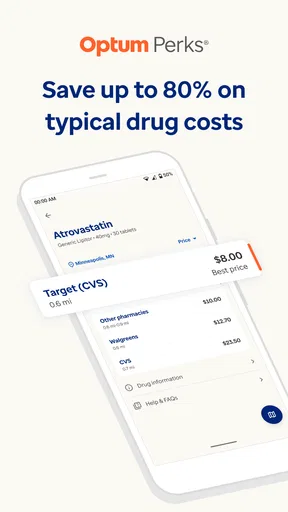
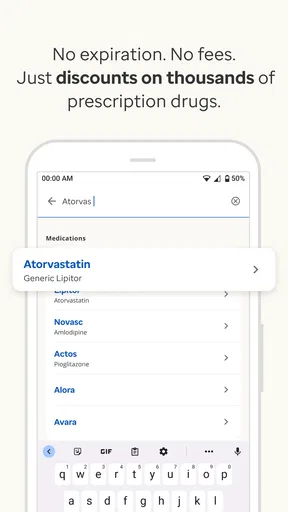
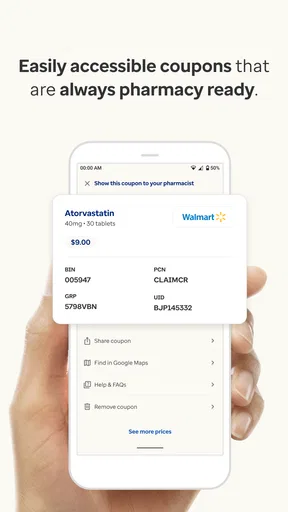
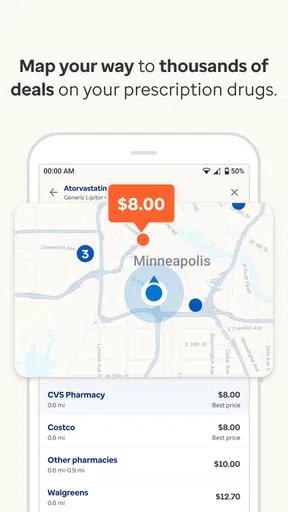
Optum Perks is a prescription discount service that helps users compare medication prices and access potential savings at participating pharmacies. After searching for a medicine in the app or on the website, you can review available prices, select a pharmacy, and present the digital coupon or discount card when paying. It is not health insurance and does not replace a prescription from a licensed medical professional.
Can Optum Perks be used with health insurance or Medicare?
The Optum Perks discount card generally cannot be combined with health insurance, Medicare, Medicaid, or other prescription coverage for the same purchase. However, it may sometimes provide a lower cash price than your insurance copay, depending on the medication and pharmacy. Ask the pharmacist to compare the available options before completing the transaction, because prices and eligibility can vary by location.
Which pharmacies accept Optum Perks discounts?
Optum Perks discounts may be accepted at many participating pharmacies across the United States, including some large national chains and independent pharmacies. Acceptance and pricing are not guaranteed at every location, so it is important to search for the specific medication and pharmacy in the app before visiting. Showing the coupon alone does not guarantee that the pharmacy will honor a particular price.
Can I use Optum Perks for any prescription medication?
The service supports many commonly prescribed medications, but availability, discounts, and restrictions differ by drug, dosage, quantity, and pharmacy. Some medicines may have limited savings or no available offer, while controlled substances and certain specialty drugs can be subject to additional rules. You still need a valid prescription, and the app should be used to compare prices rather than determine whether a medicine is medically appropriate.
Is Optum Perks free, and are there any important limitations?
Optum Perks is generally free to use, with no membership fee required to search for prices or access a discount coupon. Nevertheless, the displayed price is an estimate that can change, and pharmacies may apply their own policies. Discounts are typically available only for eligible cash-pay purchases, cannot be combined with insurance, and may not count toward deductibles or out-of-pocket maximums.


